Temporal Timeouts, Retries and Determinism: Why Workflows Get Stuck Instead of Failing
On this page
- The server cannot see the worker
- Four clocks on one activity
- Where the clocks live on the server
- Why I don't set Schedule-to-Start
- Heartbeats: proof of life, progress and cancellation
- Heartbeat throttling, and what a heartbeat costs
- The retry policy
- What a retry does on the server
- The arithmetic of "retry forever"
- Classify errors
- At-least-once means idempotency keys
- Choosing timeouts: a worked example
- Workflow-level timeouts, retries, and the TypeScript trap
- A plain Error doesn't fail a TypeScript workflow
- Timers: sleep() is a row, not a sleeping process
- The 70-second stall
- How a TypeScript worker shuts down
- The fix, end to end
- Replay, and the non-determinism error
- What breaks and what is safe
- TypeScript makes randomness and clocks safe
- What an NDE looks like on a live cluster
- Fix 1: patched()
- Fix 2: Worker Versioning
- Fix 3: Replay tests in CI
- History limits: when the history gets too long
- The loop that dies after two weeks
- Continue-as-new
- What happens on the server
- Metrics I keep on the dashboard
- Takeaways
TL;DR: The Temporal server never sees inside your worker. All it can see is time passing, so every activity gets up to four clocks: Schedule-to-Start (waiting in the queue), Start-to-Close (one attempt), Schedule-to-Close (all attempts together) and Heartbeat (the longest the worker may stay silent). Only Start-to-Close and Heartbeat are retried. By default activities retry forever, at 1 s × 2 capped at 100 s, so a permanent error runs about 860 times a day and nobody notices, because the workflow still says Running. Every timeout, retry, backoff and
sleep()is a row intimer_taskson the workflow's shard. Workflow code has a second way to get stuck: if a deploy changes the steps of a workflow that still has runs open, replay hits a non-determinism error, the workflow task fails and retries forever, and the run sits in Running. It isn't failed and it isn't lost.patched(), Worker Versioning and replay tests in CI prevent that. Histories also have hard limits (about 51,200 events or 50 MB). When a run hits one, the server terminates it, so anything that loops needs continue-as-new or a Schedule.
A good way to read a Temporal latency graph: if a latency sits at an exact number (4.9 s, 70 s, 600 s), something with a timer fired. Load doesn't explain it. Find the setting that equals that number. I learned this from a set of runScript activities that stalled for almost exactly 70 seconds and then retried. That incident is covered below, but it only makes sense after the clocks.
This post is about the two places where Temporal does what you told it to, which is often not what you meant. The first is time: timeouts, retries, heartbeats and timers, and what each one costs the database. The second is your workflow code: determinism, versioning and history size. In both, the usual failure isn't a red "Failed" badge. You get a workflow that says Running and never finishes, and dashboards that only count failed workflows stay green the whole time.
If you haven't read them yet, the History service post covers the event history (the "diary") and mutable state (the "status card"). The shards post covers why a workflow ID always lands on the same shard. I'll use both ideas here without explaining them again.
The server cannot see the worker
Once History hands an activity task to Matching and a worker polls it, the server sees nothing until the worker calls back. Ten minutes of silence could mean the task is still queued, a worker is slow, or a worker died. A single deadline gets all three wrong: a retry puts a queued task back in the same full queue, a dead worker wastes the rest of the hour, and a deadline that retries forever lets one bad task run for weeks. So Temporal uses a separate clock for each kind of wait, plus a way for the worker to say "I'm still alive".
Four clocks on one activity
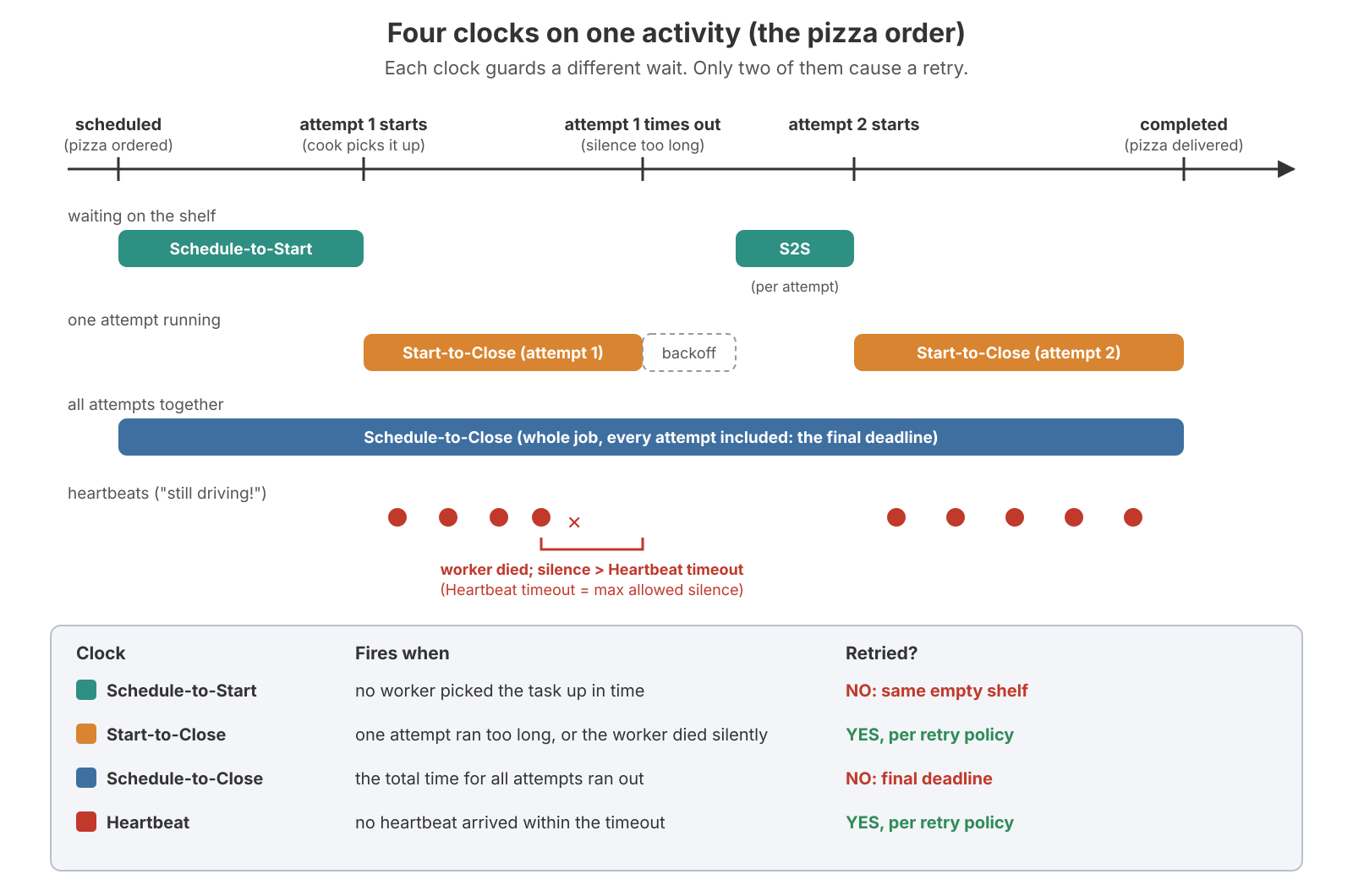
| Timeout | What it bounds | Fires when | Retried? |
|---|---|---|---|
| Schedule-to-Start | Time spent waiting in the queue | No worker picked the task up in time | No. A retry would put it back in the same queue |
| Start-to-Close | One attempt | The attempt took too long, or the worker died silently | Yes, per the retry policy |
| Schedule-to-Close | Everything: all attempts plus backoffs | The total budget ran out | No. It is the final deadline |
| Heartbeat | The longest silence between two heartbeats | The worker stopped heartbeating | Yes, per the retry policy |
You must set Start-to-Close or Schedule-to-Close, or the server rejects the ScheduleActivityTask command and the workflow task fails. Set only Schedule-to-Close, and Start-to-Close defaults to it, so one attempt can use the whole budget. Set only Start-to-Close, and there's no total deadline; with the default retry policy, the activity can retry forever. A retry that couldn't start before Schedule-to-Close runs out isn't scheduled at all. Each attempt gets fresh Start-to-Close and Heartbeat clocks; Schedule-to-Close is shared across attempts.
In TypeScript you set them on the activity stubs. Group activities by how long they run, not by file:
// workflows.ts
import { proxyActivities } from '@temporalio/workflow';
import type * as activities from './activities';

const { chargeCard } = proxyActivities<typeof activities>({
  startToCloseTimeout: '30 seconds',    // one attempt
  scheduleToCloseTimeout: '10 minutes', // all attempts together (safety net)
});

const { exportRows } = proxyActivities<typeof activities>({
  startToCloseTimeout: '2 hours',  // a long job
  heartbeatTimeout: '60 seconds',  // ...that must prove it is alive every minute
  retry: { maximumAttempts: 5 },
});
Where the clocks live on the server
The worker doesn't keep the clock. The shard does. Every activity clock is an ActivityTimeout row in timer_tasks for the workflow's shard, with a future visibility_timestamp. When History records RecordActivityTaskStarted, it inserts the Start-to-Close or Heartbeat timer in the same transaction that updates executions and activity_info_maps. When a timer fires, the executor first re-checks mutable state to see whether the attempt is still running. If the activity already completed, the timer does nothing, which is why stale timers are harmless and never need to be deleted early.
The Schedule-to-Start deadline also travels with the task to Matching, which drops a backlog task once its deadline has passed (tasks_dropped). But only History's own timer actually fails the activity.
Why I don't set Schedule-to-Start
I leave it unset and alert on the metric temporal_activity_schedule_to_start_latency instead. The metric says "the queue is slow" for every task; the timeout only kills individual tasks. On a single shared queue it's actively harmful: if every worker for that queue goes down, every activity on it times out at once and all the workflows take their error path together. Unless that path really does something (another queue, a human), the timeout just turns "delayed" into "failed". A delayed task finishes once the workers come back. A failed one doesn't.
Heartbeats: proof of life, progress and cancellation
Say an activity has Start-to-Close = 1 h, and its worker is killed 2 minutes in.
- No heartbeat: the server can't tell a dead worker from a slow one. It waits the full hour, about 58 minutes after the crash, and only then retries.
- 60 s heartbeat timeout: the activity heartbeats regularly, the worker dies, the heartbeats stop, and within 60 s of the last one the server declares the attempt dead and retries.
Heartbeats turn "we found out after an hour" into "we found out in a minute". This matters for every deploy. When a worker is replaced, any activity that runs longer than the shutdown grace period is killed mid-flight. Without heartbeats, it sits until Start-to-Close expires. Long activities must heartbeat with a short heartbeat timeout, or every deploy and scale-in stalls them. (The workers post covers slots and deploy behaviour.)
Heartbeats also do two other things:
- Progress. Details you pass to
heartbeat()are saved. The next attempt can read them and resume from row 5,000 instead of row 0. - Cancellation. A running activity learns it has been cancelled (or has already timed out) through the heartbeat response. An activity that never heartbeats can never be cancelled: it runs to the end and its result is thrown away.
// activities.ts
import { Context } from '@temporalio/activity';

export async function exportRows(jobId: string): Promise<number> {
  const ctx = Context.current();
  // Resume from the last checkpoint of the previous attempt (undefined on attempt 1)
  let row: number = ctx.info.heartbeatDetails?.row ?? 0;

  while (row < 1_000_000) {
    await copyBatch(jobId, row, 5_000, { signal: ctx.cancellationSignal }); // pass the AbortSignal down
    row += 5_000;
    ctx.heartbeat({ row }); // cheap: the SDK throttles what it really sends
  }
  return row;
}
ctx.cancellationSignal is an AbortSignal. Pass it to fetch, database clients and child processes so cancellation actually stops the work. If the activity times out on its final attempt, the workflow gets an ActivityFailure whose cause is a TimeoutFailure, with lastHeartbeatDetails holding the last checkpoint.
Heartbeat throttling, and what a heartbeat costs
Calling heartbeat() often is fine. The TypeScript SDK sends at most one heartbeat every 80% of the heartbeat timeout, capped by maxHeartbeatThrottleInterval (60 s by default; 30 s via defaultHeartbeatThrottleInterval when there's no heartbeat timeout, both version-dependent). On failure it flushes the pending heartbeat first, so the next attempt sees the newest checkpoint.
Each heartbeat that does reach the server is a real request: worker → Frontend (RecordActivityTaskHeartbeat) → History → an update to the activity's row in activity_info_maps. It adds no event to the history, but it's still a database write. Illustrative numbers: 2,000 long activities with a 60 s heartbeat timeout send one each per ~48 s, about 42 RPCs/s. That's nothing. Drop the timeout to 5 s and it's 500 RPCs/s of writes just to say "still alive". With 5,000 activities and a 2 s timeout, it's about 3,100/s, and a GC pause longer than 2 s now looks like a dead worker.
My rule of thumb: make the heartbeat timeout a few times longer than the gap between two progress points, and as short as that allows (heartbeat every ~10 s, timeout 30 s). One trap: heartbeat() from a local activity does nothing. Local activities aren't for long work.
The retry policy
When an attempt fails (an error is thrown, or Start-to-Close or Heartbeat fires), the server uses the retry policy to decide whether and when to try again. Activities get a default policy. Workflows get none.
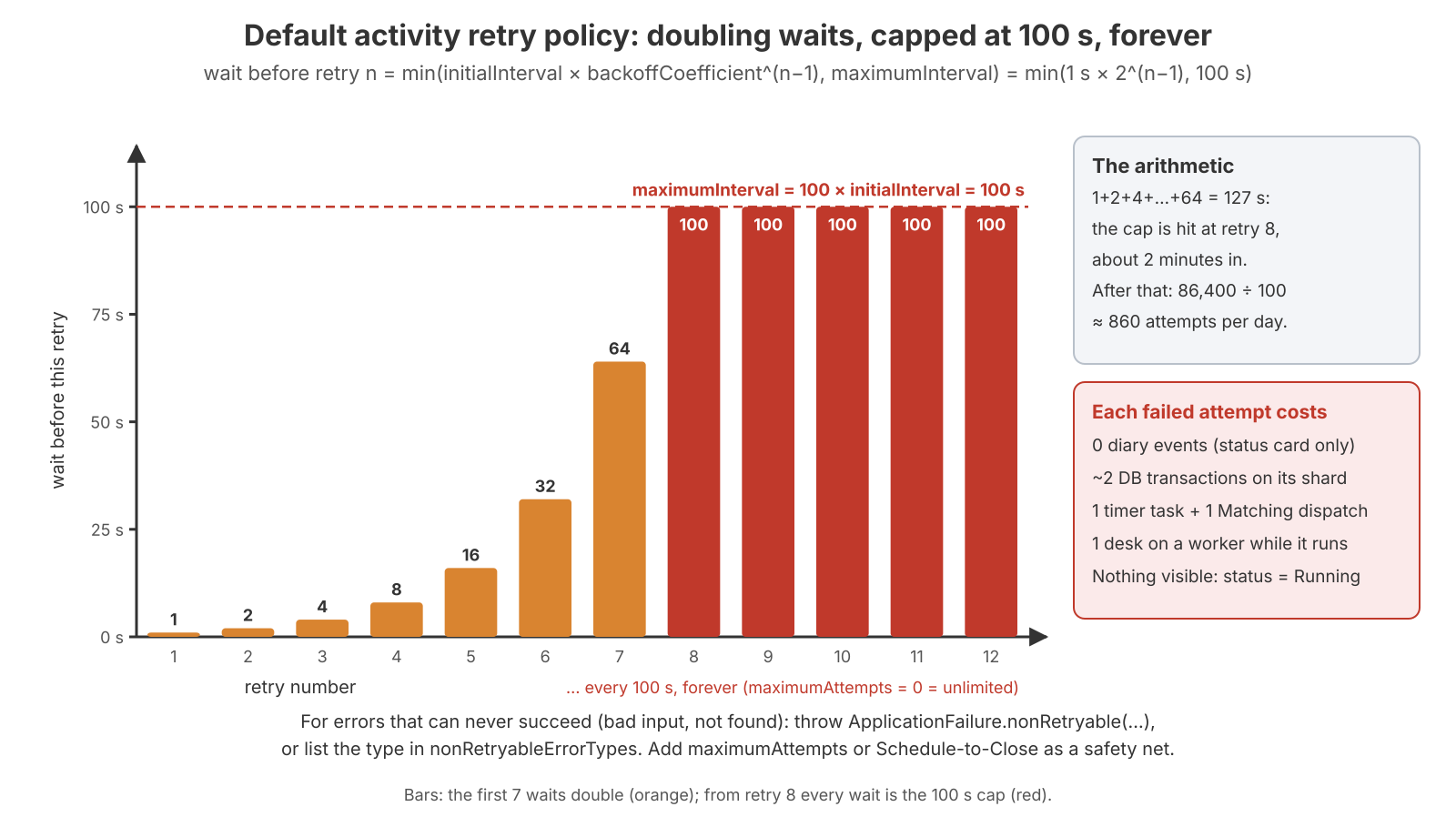
| TS field | Default | Meaning |
|---|---|---|
initialInterval | 1 s | Wait before the first retry |
backoffCoefficient | 2 | Each wait multiplies: 1 s, 2 s, 4 s, 8 s… |
maximumInterval | 100 × initialInterval | The longest any single wait gets |
maximumAttempts | 0 / unset = unlimited | Activities retry forever by default |
nonRetryableErrorTypes | none | Error types that are never retried |
wait(n) = min(initialInterval × backoffCoefficient^(n−1), maximumInterval)
        = min(1 s × 2^(n−1), 100 s)        with the defaults
Newer SDKs also let a failure carry its own next-retry delay (ApplicationFailure.create({ nextRetryDelay })), which overrides the formula.
What a retry does on the server
An activity retry doesn't write a history event. It all happens in mutable state. After RespondActivityTaskFailed (or an ActivityTimeout firing), History checks the policy and, if it retries, runs one UpdateWorkflowExecution: an activity_info_maps UPDATE (attempt + 1, last failure) and a timer_tasks INSERT of an ActivityRetryTimer at now + backoff. When that timer fires, the timer queue processor calls Matching's AddActivityTask directly, with no transfer task. Only when the activity finally closes does History append ActivityTaskStarted (with attempt N) and the completed/failed/timed-out event.
So an activity that failed 49 times and then succeeded shows exactly three events: ActivityTaskScheduled, ActivityTaskStarted (attempt 50), ActivityTaskCompleted. Retries don't make the history longer. They make the database busier. Each failed attempt costs an UpdateWorkflowExecution, a timer fire, a Matching dispatch (plus a tasks INSERT if no poller was waiting), and another UpdateWorkflowExecution when the next attempt starts.
To see retries you need mutable state, not the history:
# Pending activities: attempt, last failure, last heartbeat time/details, next attempt time
temporal workflow describe --workflow-id order-42

# The history: only the final attempt of each activity appears
temporal workflow show --workflow-id order-42
The arithmetic of "retry forever"
- Retries 1–7 wait 1 + 2 + 4 + 8 + 16 + 32 + 64 = 127 s. Retry 8, about 2 minutes in, is the first one at the 100 s cap.
- After that it's one attempt every 100 s: 86,400 ÷ 100 ≈ 860 attempts a day.
- Each attempt is about 2 shard transactions plus a dispatch, so roughly 1,700 writes a day for one stuck activity.
- With 1,000 workflows stuck on the same permanent bug (illustrative), that's 860,000 attempts and about 1.7 million writes a day, and none of them do anything useful. Every one of those workflows shows Running with no visible error.
Classify errors
Retry temporary errors (network, rate limit, timeout). Fail permanent errors (bad input, not found, permission denied) at once. There are two ways to mark an error as permanent:
// 1. In the activity: throw a non-retryable failure
import { ApplicationFailure } from '@temporalio/activity';

export async function loadCustomer(id: string) {
  const c = await db.customers.find(id);
  if (!c) throw ApplicationFailure.nonRetryable(`customer ${id} not found`, 'InvalidCustomerId');
  return c;
}

// 2. In the workflow's activity options: list error TYPES that are never retried
const { loadCustomer } = proxyActivities<typeof activities>({
  startToCloseTimeout: '10 seconds',
  retry: {
    nonRetryableErrorTypes: ['InvalidCustomerId'],
    maximumAttempts: 10, // safety net for errors you did not think of
  },
});
nonRetryableErrorTypes matches the failure's type. That's the second argument to ApplicationFailure.nonRetryable or the type passed to ApplicationFailure.create, or the class name of a plain error (err.name, e.g. "TypeError"). Check this on your SDK version. Then catch it in the workflow and make a business decision instead of retrying:
import { ActivityFailure, ApplicationFailure } from '@temporalio/workflow';

try {
  await loadCustomer(order.customerId);
} catch (err) {
  if (err instanceof ActivityFailure && err.cause instanceof ApplicationFailure
      && err.cause.type === 'InvalidCustomerId') {
    await markOrderInvalid(order.id);
    return 'invalid';
  }
  throw err;
}
At-least-once means idempotency keys
If an attempt performed its side effect and died before reporting back, the retry does it again. Temporal can't make your external call happen only once, so send an idempotency key that's identical on every attempt:
import { Context } from '@temporalio/activity';

export async function chargeCard(orderId: string, amountCents: number) {
  const { workflowExecution, activityId } = Context.current().info;
  const idempotencyKey = `${workflowExecution.workflowId}:${activityId}`; // same on every attempt
  return payments.charge({ orderId, amountCents, idempotencyKey });
}
When a downstream goes down, thousands of activities retry at once: timer queues, Matching and PostgreSQL all stay busy while nothing completes. maximumInterval is your load-shedding knob. A bigger cap means fewer pointless attempts during an outage, and slower recovery afterwards.
Choosing timeouts: a worked example
Take a payment API call that normally takes 2 s but sometimes hangs for 30 minutes. Put an HTTP timeout of ~10 s inside the activity; that's the real fix for the hang. Set Start-to-Close a little above it (15–30 s) as a safety net in case the worker itself freezes. Don't add a heartbeat: a 2 s call has no progress to report. And send an idempotency key, because if the API charged the card and then hung, the retry charges it again.
My general table (rules of thumb, not gospel):
| Activity shape | Start-to-Close | Heartbeat timeout | Schedule-to-Close | Retry policy |
|---|---|---|---|---|
| Short RPC (a few s) | 3–10 × p99, above the in-code HTTP timeout | none | optional total budget | default + nonRetryableErrorTypes |
| Long job with progress | the real worst case | a few × the progress interval (30–60 s) | optional | bounded maximumAttempts |
| Fragile third party | above the HTTP timeout | none | yes: "give up after X" | larger maximumInterval to shed load |
| Must never run twice | as above | as above | as above | same, plus an idempotency key on the far side |
Workflow-level timeouts, retries, and the TypeScript trap
| Timeout | Meaning | Default |
|---|---|---|
| Workflow Execution Timeout | Lifetime of the whole chain, including continue-as-new and retries | Unlimited |
| Workflow Run Timeout | One run | Unlimited |
| Workflow Task Timeout | How long a worker may take to process one workflow task | 10 s |
I leave the first two unlimited and put deadlines on activities instead. When a workflow timeout fires, the workflow is closed without running any cleanup code. A cancellation, by contrast, is something your code can catch. If you need a business deadline with a clean exit, use a timer in workflow code.
A workflow task should take milliseconds (the task timeout is 10 s). When a worker dies, its workflows can pause for one sticky schedule-to-start timeout (5 s in Go, 10 s for TypeScript's stickyQueueScheduleToStartTimeout in current releases, version-dependent) before the task falls back to the normal queue. Failing workflow tasks (attempt 2 and later) are transient: they write no new events until one completes, so a crash loop doesn't grow the history.
Workflows have no default retry policy. If one is attached at start, a failed run is closed and a new run is created in one transaction (same workflow ID, original input, same shard) behind a WorkflowBackoffTimer. Retry, cron and continue-as-new all share this machinery. The new run re-runs every activity from the top, which is rarely what a business process wants. Prefer activity retries plus explicit error handling.
A plain Error doesn't fail a TypeScript workflow
This one has bitten me. In the TypeScript SDK, only a TemporalFailure (usually ApplicationFailure) thrown out of the workflow function fails the workflow execution. Any other error (TypeError, new Error(...), a failed JSON.parse) fails the workflow task. The task is then retried again and again while the workflow shows Running.
This is deliberate: a bug in your code should be fixable by deploying a fix, not by losing the workflow. To fail on purpose, throw ApplicationFailure.create({ message, nonRetryable: true }). Newer SDKs let WorkerOptions.workflowFailureErrorTypes change which error types fail the execution. The signal to watch is temporal_workflow_task_execution_failed, plus temporal workflow describe showing a pending workflow task with an attempt count above 1. You'll see the same "stuck, not failed" pattern again in the determinism half of this post.
Timers: sleep() is a row, not a sleeping process
await sleep('1 hour') doesn't keep anything running for an hour. The worker finishes its workflow task with a StartTimer command. History appends TimerStarted, inserts a timer_info_maps row and, only if this is now the earliest pending user timer of the run, a UserTimer row in timer_tasks with visibility_timestamp = now + 1h. For the next hour the workflow can be evicted from every cache. The shard's timer queue processor reads timer_tasks in timestamp order, a little ahead of time. When the hour is up it loads mutable state (a GetWorkflowExecution read if it isn't cached), appends TimerFired, schedules a workflow task, and inserts the row for the next pending timer. A cancelled timer's row still fires, finds nothing pending, and does nothing.
The same mechanism handles all server-side time:
| Timer task | Created when | Fires to |
|---|---|---|
UserTimer | StartTimer (earliest pending only) | TimerFired + a new workflow task |
ActivityTimeout | activity scheduled / started / heartbeat | ActivityTaskTimedOut, or a retry |
WorkflowTaskTimeout | workflow task scheduled (sticky) / started | timeout → reschedule (transient) |
ActivityRetryTimer | retryable activity failure | AddActivityTask to Matching |
WorkflowBackoffTimer | workflow retry / cron / start delay | first WorkflowTaskScheduled |
WorkflowRunTimeout, WorkflowExecutionTimeout | run start, if set | timeout close (and maybe retry) |
DeleteHistoryEvent | run close + retention | delete the run's rows (History does this, not the internal worker) |
What goes wrong with timers:
- Timer storms. A million workflows sleeping "until midnight" fire in the same second. Each shard's timer queue has to chew through its share, and timers fire minutes late. Add jitter:
await sleep(base + Math.floor(Math.random() * 60_000)), which is replay-safe in a TypeScript workflow. timer_tasksbloat. Insert-then-range-delete churn. If autovacuum falls behind, range reads slow down (the PostgreSQL post covers this).- Clock skew. Timers use wall-clock timestamps, so keep NTP/chrony healthy.
A quick way to see timer queue lag straight from the database:
-- Overdue timer tasks per shard: timers that should already have fired.
-- visibility_timestamp is stored in UTC, without time zone.
SELECT shard_id, count(*) AS overdue
FROM timer_tasks
WHERE visibility_timestamp < (now() AT TIME ZONE 'UTC') - interval '30 seconds'
GROUP BY shard_id ORDER BY overdue DESC LIMIT 10;
The 70-second stall
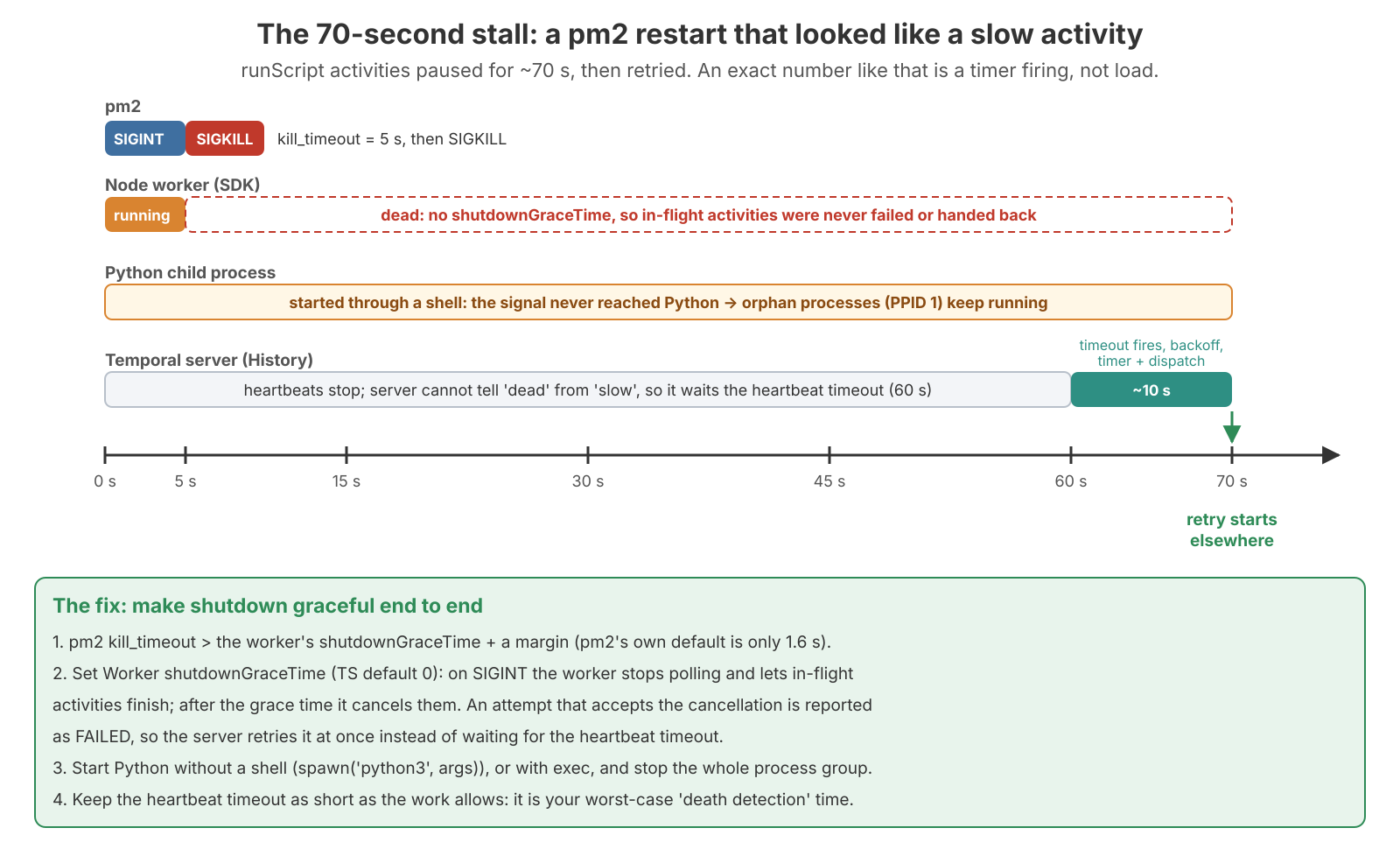
Now back to the incident. Some runScript activities, which run a Python script from a Node worker managed by pm2, stalled for almost exactly 70 seconds and then retried.
An exact number means a timer. 70 s is the 60 s heartbeat timeout plus roughly 10 s for the kill window, the timeout firing, the retry backoff and dispatch to a new worker. (That breakdown of the last ~10 s is my inference, not something I measured.)
Why did the heartbeats stop? Because pm2 had killed the worker:
- pm2 waited only 5 s (
kill_timeout) after SIGINT before sending SIGKILL. - The worker had no
shutdownGraceTime, so its in-flight activities were never finished, failed or handed back. - The Python script was started through a shell, so the signal never reached Python. The leftover Python processes became orphans (PPID 1).
From the server's side, a silent worker looks exactly like a slow one, so it waited out the full heartbeat timeout before retrying elsewhere.
How a TypeScript worker shuts down
- The TS
Runtimeinstalls handlers for shutdown signals (by defaultSIGINT,SIGTERM,SIGQUIT,SIGUSR2; version-dependent) and callsworker.shutdown(). shutdown()stops polling immediately. In-flight activities keep running forshutdownGraceTime, which defaults to 0 in TypeScript.- After the grace time, the worker cancels running activities (
CancelledFailure, messageWORKER_SHUTDOWN). If the activity lets that error escape, the attempt is reported as failed, not cancelled, so the server retries it at once instead of waiting for a timeout. shutdownForceTime(optional) is the hard stop. After it, the worker throwsGracefulShutdownPeriodExpiredError.
So with a grace time of 0, SIGINT cancels everything instantly. After a SIGKILL, nothing is reported at all.
The fix, end to end
// ecosystem.config.js (pm2): give the worker time to drain BEFORE SIGKILL
module.exports = {
  apps: [{
    name: 'temporal-worker',
    script: 'dist/worker.js',
    kill_timeout: 35000, // ms; must be > shutdownGraceTime + a margin (pm2 default is 1600 ms)
  }],
};// worker.ts
const worker = await Worker.create({
taskQueue: 'scripts',
activities,
workflowsPath: require.resolve('./workflows'),
shutdownGraceTime: '30 seconds', // let in-flight activities finish first
});
await worker.run(); // resolves after a graceful shutdown// activities.ts: run Python without a shell, and tie it to cancellation
import { spawn } from 'node:child_process';
import { Context } from '@temporalio/activity';
export async function runScript(path: string): Promise<number> {
const ctx = Context.current();
const child = spawn('python3', [path], { stdio: 'inherit' }); // no shell: signals reach Python
const beat = setInterval(() => ctx.heartbeat(), 10_000); // prove we are alive
ctx.cancellationSignal.addEventListener('abort', () => child.kill('SIGTERM'));
try {
return await new Promise<number>((resolve, reject) => {
child.on('exit', (code) => (code === 0 ? resolve(0) : reject(new Error(`exit ${code}`))));
child.on('error', reject);
});
} finally {
clearInterval(beat);
}
}If you must go through a shell, use exec python3 ... so the shell is replaced by Python, or spawn with detached: true and kill the whole process group (process.kill(-child.pid, 'SIGTERM')). And keep the heartbeat timeout as short as the work allows, because it's your worst-case time to detect a dead worker.
Replay, and the non-determinism error
Now the second half: your workflow code. A worker doesn't remember a workflow. To continue one after a crash or cache eviction, it replays your code from the top against the event history, answering finished steps from the history. Workers never write events; a workflow task ends with commands (ScheduleActivityTask, StartTimer, StartChildWorkflowExecution…) that History turns into events. During replay the worker compares:
commands my code produces now vs events in the history- Each command must match the next recorded event: same type (activity vs timer vs child), same order, and for activities the same activity type name.
- Most SDKs don't compare activity arguments or timer durations during replay. Changing them doesn't raise an error, but old runs keep the values that were recorded. This varies by SDK, so don't rely on it; let a replay test decide.
- The inside of an activity is never re-run on replay. The worker reads
ActivityTaskCompletedand its result from the history.
If you add a step in the middle, a run that's already past that point disagrees with its own history:
OLD code             History of a running workflow     NEW code
1. wall              step 1: wall                      1. wall
2. tower             step 2: tower                     2. MOAT         <- new
3. gate                                                3. tower
                                                       4. gate
Step 1 matches. At step 2 the code says moat and the history says tower. The worker can't know which is real, so it stops. That's a non-determinism error (NDE).
What breaks and what is safe
| Breaks running workflows | Safe |
|---|---|
| Adding, removing or reordering activities, timers or child workflows | Changing activity code (activities are never re-run on replay) |
| Renaming an activity type or the workflow type | Changing log lines |
Swapping sleep('1h') for an activity, or vice versa | Changes behind a version check (below) |
| Code whose result can differ between first run and replay | Changing activity options (timeouts, retry policy apply to new schedules) |
| Changing a branch condition so old runs take a different path | Adding a new signal or query handler |
When I review workflow code, I ask one question: are there runs still going that already passed this point? Changing an email template inside an activity while 10,000 workflows run is safe. Adding await auditLog() between two existing activities isn't: runs already past that point recorded sendEmail as step 2, the new code produces auditLog, and they hit an NDE.
TypeScript makes randomness and clocks safe
The textbook NDE causes, Math.random() and the real clock, are real in Go, Java and Python. In TypeScript, workflow code runs in a sandboxed V8 context where Math.random() is seeded per run, Date.now() returns workflow time from the history, uuid4() from @temporalio/workflow is replay-safe, and Node APIs (fs, net, http) are refused by the bundler. So the real TypeScript risk is changing the steps, a dependency upgrade that changes workflow-side behaviour, or a condition that reads a constant changed in a deploy. if (Math.random() < 0.1) await sendSurvey() is fine; changing 0.1 to 0.5 later is not.
What an NDE looks like on a live cluster
The worker raises a DeterminismViolationError (in TypeScript), the workflow task fails, the server reschedules it, and every worker that picks it up fails the same way. The workflow stays Running: not failed, not lost, and the history doesn't grow because the retries are transient. Deploy compatible code and the next retry replays cleanly, as if nothing happened.
During a bad deploy, failed-workflow dashboards stay green, because nothing fails. If the failed-workflow alert is silent but orders aren't moving, look at workflow-task failures:
# NDEs and other workflow-task failures, by reason (delta counters from the SDK: sum_over_time)
sum by (task_queue, failure_reason) (sum_over_time(temporal_workflow_task_execution_failed[5m]))
Alert on that metric (the label value for NDEs is NonDeterminismError; grep your worker's metrics to confirm), not only on failed workflows. Newer servers also tag workflows whose tasks keep failing with a system search attribute:
# Version-dependent: check `temporal operator search-attribute list`
temporal workflow list --query 'TemporalReportedProblems IS NOT NULL'
Recovery, from least to most invasive:
- Roll back the workflow code. Stuck runs continue on their next retry.
- Redeploy with
patched()around the new step, so old runs take the old path. - Reset individual runs to an event before the incompatible point:
temporal workflow reset --workflow-id order-42 --type LastWorkflowTask --reason "NDE after deploy", or--event-id. A batch form takes--query. Reset re-runs everything after that point, including activities, so it's a business decision, not just an ops one. Check the flags on your CLI version.
Fix 1: patched()
You want one version of the code that both old and new runs can follow. The run needs to know which kind it is, and the answer gets written into the history:
import { patched, proxyActivities } from '@temporalio/workflow';
import type * as activities from './activities';
const { makePdf, sendSms, sendEmail } = proxyActivities<typeof activities>({ startToCloseTimeout: '1 minute' });

export async function sendInvoice(id: string): Promise<void> {
  await makePdf(id);
  if (patched('add-sms-v1')) { // new runs: true, and records a marker in the history
    await sendSms(id);         // old runs replaying: false (no marker in their history)
  }
  await sendEmail(id);
}
A new run reaching patched() for the first time gets true, and a MarkerRecorded event is written. An old run replaying finds no marker at that point and gets false. When a new run is replayed later, it finds the marker and gets true again. Old and new runs both stay consistent with their own histories.
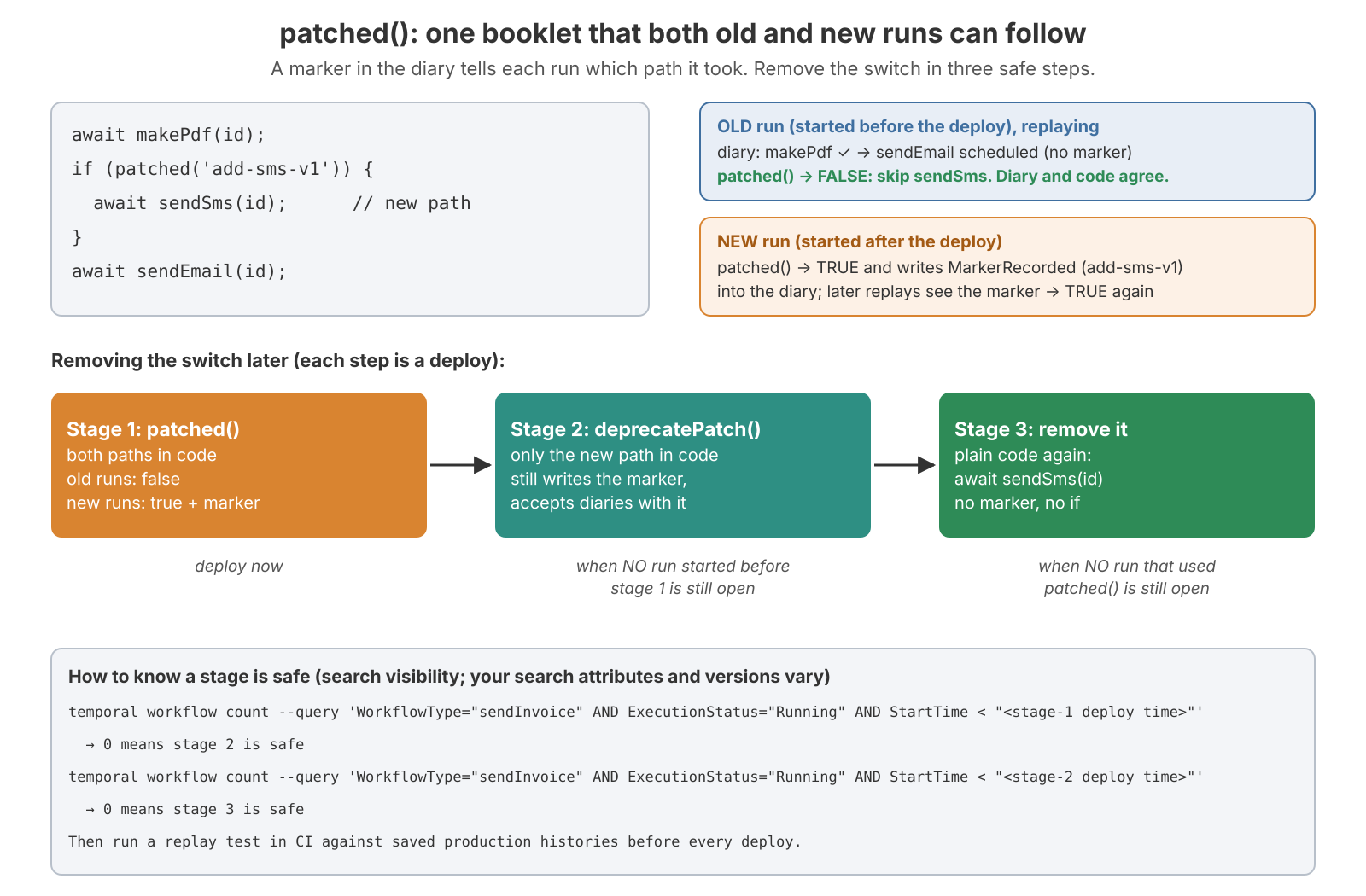
Removing the switch takes three deploys:
- Stage 1:
patched('add-sms-v1')with both paths. - Stage 2: once every run that started before stage 1 has finished, replace it with
deprecatePatch('add-sms-v1')and keep only the new path.deprecatePatchkeeps writing the marker and accepts histories that have it. - Stage 3: once every run that started before stage 2 has finished, delete it. Plain code again.
Visibility tells you when each stage is safe:
# Stage 2 is safe when this returns 0 (StartTime = the stage-1 deploy time)
temporal workflow count --query 'WorkflowType="sendInvoice" AND ExecutionStatus="Running" AND StartTime < "2026-10-01T09:00:00Z"'
Use a unique, descriptive ID per change (add-sms-v1, not v2) and never reuse one. Keep a list of open patches per workflow type with the date each stage is due. Long-lived workflows keep patches around for as long as they run; continue-as-new shortens that, as covered below.
Fix 2: Worker Versioning
Instead of if branches, keep old code for old runs. Each worker deployment is tagged with a build ID. Old runs stay on old workers, new runs go to new workers, and once the old runs drain you shut the old workers down. The server routes each workflow task to a worker of the right build.
The API has been renamed several times. Current SDKs and servers use Worker Deployments: a deployment name (e.g. invoice-service) plus a build ID (e.g. a git SHA) makes a deployment version. The server keeps a current version per deployment, and optionally a ramping version that gets a percentage of new runs. Each workflow type has a versioning behavior:
PINNED: a run stays on the version it started on for its whole life. It never needspatched(), but you have to keep old workers running until their runs drain.AUTO_UPGRADE: a run moves to the current version on its next workflow task, so it needs the same replay safety (andpatched()) as unversioned code.
// worker.ts (verify option names on your SDK version)
const worker = await Worker.create({
  taskQueue: 'invoices',
  workflowsPath: require.resolve('./workflows'),
  activities,
  workerDeploymentOptions: {
    useWorkerVersioning: true,
    version: { deploymentName: 'invoice-service', buildId: process.env.GIT_SHA! },
    defaultVersioningBehavior: 'PINNED',
  },
});# Ramp, then promote, then watch the old version drain (verify with `temporal worker deployment --help`)
temporal worker deployment set-ramping-version --deployment-name invoice-service --build-id 9f2c1ab --percentage 10
temporal worker deployment set-current-version --deployment-name invoice-service --build-id 9f2c1ab
temporal worker deployment describe-version --deployment-name invoice-service --build-id 41aa07eThe older "build ID compatibility" API (useVersioning: true + updateBuildIdCompatibility) is deprecated. Worker Deployments need a recent server and SDK. With pm2, they also mean running two sets of worker processes side by side during a rollout instead of restarting in place.
patched() | Worker Versioning (PINNED) | |
|---|---|---|
| Code | if branches, removed over 3 deploys | clean code per build |
| Ops | one fleet, normal restarts | old and new fleets side by side until old runs drain |
| Good for | small changes in long-lived workflows | frequent deploys of short or medium workflows |
| Bad for | many overlapping patches | workflows that run for months |
Plenty of teams use both: PINNED for most workflows, and patched() or continue-as-new for the rare ones that run for months.
Fix 3: Replay tests in CI
Download real histories from production and replay them against the new code. If the replay throws, the change would break running workflows. This catches NDEs before production does.
temporal workflow show --workflow-id order-42 --output json > test/histories/order-42.json// test/replay.test.ts
import { Worker } from '@temporalio/worker';
import { readFileSync, readdirSync } from 'node:fs';
describe('replay against production histories', () => {
for (const file of readdirSync('test/histories')) {
it(`replays ${file}`, async () => {
const history = JSON.parse(readFileSync(`test/histories/${file}`, 'utf8'));
await Worker.runReplayHistory(
{ workflowsPath: require.resolve('../src/workflows') },
history,
); // throws (wrapping DeterminismViolationError) on a mismatch
});
}
});The TS SDK can also pull histories straight from the cluster with client.workflow.list({ query }).intoHistories() and feed them to Worker.runReplayHistories (version-dependent). Pick histories carefully: keep one per workflow type for each step where a run can be waiting (before the first activity, mid-loop, waiting on a signal, after a timer). A completed history only tests the path it took. Refresh them when you add steps.
History limits: when the history gets too long
The history isn't just storage. On every cache miss (worker restart, sticky miss, another worker taking over), the whole history is sent to a worker and replayed from event 1. A 50,000-event history means a large ReadHistoryBranch read from PostgreSQL, a lot of network, and seconds of worker CPU on every replay. So the server caps it. These are namespace-scoped dynamic config keys; the defaults are version-dependent, and the .error values here were checked against v1.32:
| Key | Default | What happens |
|---|---|---|
limit.historyCount.suggestContinueAsNew | 4,096 events | continueAsNewSuggested becomes true |
limit.historySize.suggestContinueAsNew | 4 MB | same |
limit.historyCount.warn | 10,240 events | warning in server logs |
limit.historySize.warn | 10 MB | warning in server logs |
limit.historyCount.error | 51,200 events | the server terminates the workflow |
limit.historySize.error | 50 MB | the server terminates the workflow |
limit.blobSize.warn / .error | 512 KB / 2 MB per payload | warn, then the carrying call/command is rejected |
Raising the .error limits moves the risk onto your hosts: History memory and replay CPU. There are also caps on how much one run can have pending at once (activities, children, signals, cancel requests; limit.numPending*.error, around 2,000 each, version-dependent). A workflow that fans out 10,000 activities at once hits those first.
Payloads count toward history size. Every activity input and result is stored in the history, so an activity returning a 1 MB JSON blob adds 1 MB per call. Fifty such calls reach 50 MB long before the event count matters, which is how a workflow gets terminated after only 60 events. Pass references (an object-storage key, a database ID), not the data.
The loop that dies after two weeks
Take a workflow that loops forever: "every 5 minutes, check for new orders". Count the events in one iteration:
timer started + timer fired                             = 2
workflow task scheduled + started + completed           = 3
check-orders activity scheduled + started + completed   = 3
another workflow task after the activity                = 3
                                                ≈ 11 events every 5 minutes
11 events × 288 loops a day ≈ 3,170 events a day. 51,200 ÷ 3,170 ≈ 16 days, after which the server terminates it. The suggestion to continue-as-new arrived after about 1.3 days, and the log warning after about 3. Nobody was looking.
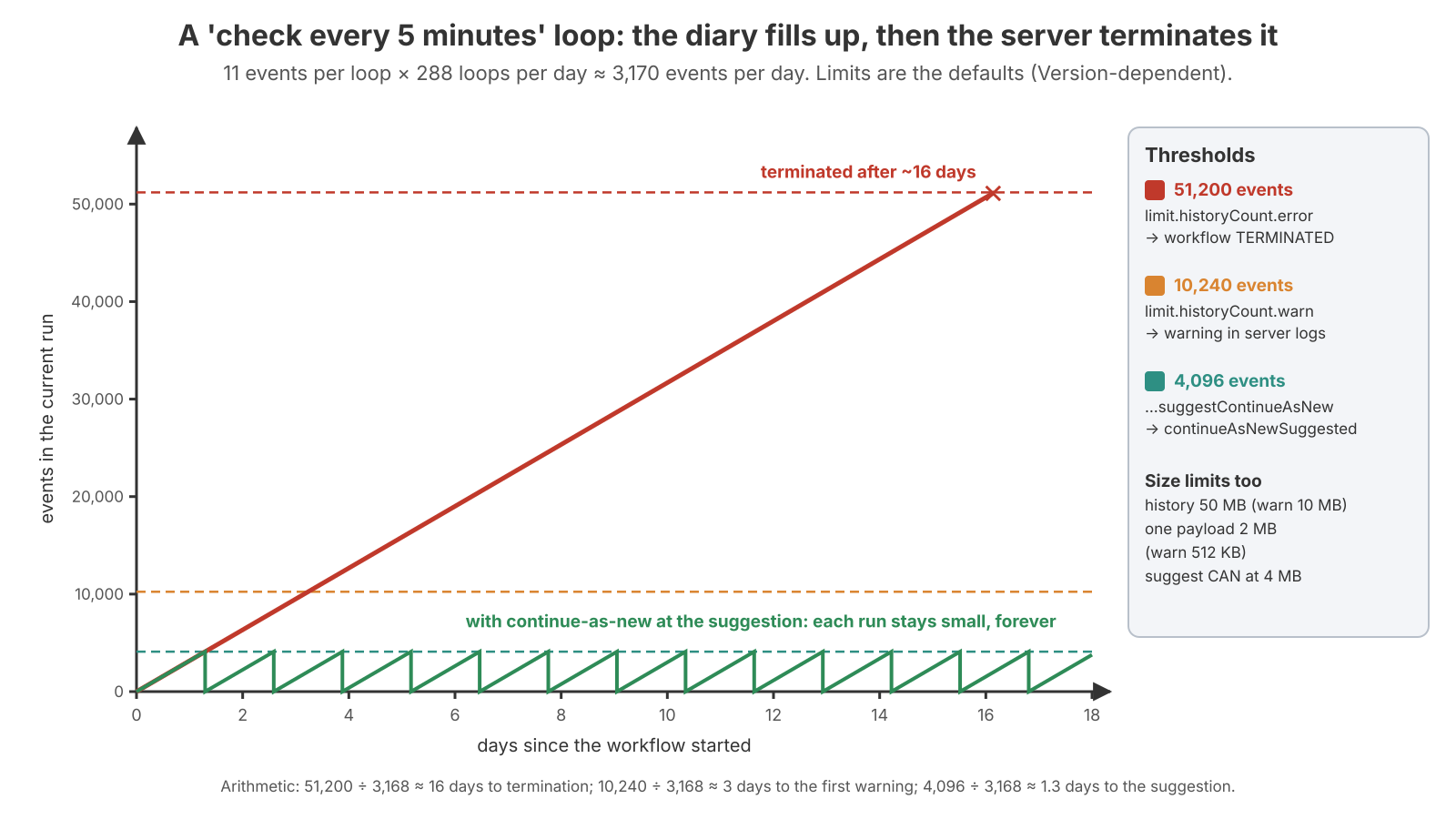
There are two fixes. You can continue-as-new when workflowInfo().continueAsNewSuggested is true. Or, better for "every 5 minutes, do X", don't loop at all: use a Schedule that starts a short workflow every 5 minutes, so each run has a tiny history and finishes.
import { ScheduleOverlapPolicy } from '@temporalio/client';
await client.schedule.create({
  scheduleId: 'check-orders-every-5m',
  spec: { intervals: [{ every: '5 minutes' }] },
  action: { type: 'startWorkflow', workflowType: checkOrdersOnce, taskQueue: 'orders' },
  policies: { overlap: ScheduleOverlapPolicy.SKIP }, // never two at once
});
Continue-as-new
Continue-as-new ends the current run and starts a new one with the same workflow ID, passing state along as the new run's input. Think of it as a new notebook whose first page says "carried over: 1,240 orders processed".
import { continueAsNew, workflowInfo, condition, allHandlersFinished } from '@temporalio/workflow';

export async function orderSync(state: { processed: number }): Promise<void> {
  for (;;) {
    await processNextBatch(state);
    if (workflowInfo().continueAsNewSuggested) {
      await condition(allHandlersFinished);          // let running signal/update handlers finish
      await continueAsNew<typeof orderSync>(state); // never returns: this run ends here
    }
  }
}
workflowInfo() also exposes historyLength and historySize if you want your own threshold, and makeContinueAsNewFunc(...) changes options for the next run.
Continue-as-new is also a versioning tool. The new run starts on the latest code with no old history to match, so a workflow that continues-as-new daily only has to carry patches for a day instead of months. (With Worker Versioning, a PINNED run stays pinned across continue-as-new unless you ask for an upgrade, e.g. initialVersioningBehavior: 'AUTO_UPGRADE' in recent TS SDKs.)
What happens on the server
If a signal arrived during the task (buffered events), History rejects the ContinueAsNewWorkflowExecution command with UnhandledCommand and the worker gets a new task containing the signal, so nothing is lost. Otherwise run 1 gets WorkflowExecutionContinuedAsNew, run 2 gets WorkflowExecutionStarted, and PostgreSQL gets two history appends plus one UpdateWorkflowExecution transaction. That transaction closes run 1, inserts run 2, moves current_executions to run 2, and writes both runs' tasks, including run 1's DeleteHistoryEvent retention timer. There's never a moment with zero or two current runs.
Continue-as-new never changes shards. The shard key is namespaceID + workflowID, not the run ID, so a workflow that continues-as-new forever stays on one shard and one History host. That's good for locality, and bad if that one workflow ID is extremely hot.
What can hurt:
- Tight loops. Continuing every few events costs a create-sized transaction each time, plus a future retention delete. Continue at the server's suggestion (thousands of events), not on every iteration.
- Large input. It's copied into the new run's first event. Carry a summary, not a full list.
- Retention backlog. Every closed run becomes a
DeleteHistoryEventtimer that fires N days later and deleteshistory_node/executionsrows. It's delayed database load that's easy to forget when you design the workflow. - In-memory signal queues. History won't lose buffered signals, but your code has to drain its own queue (or pass it in the new input) and wait for
allHandlersFinished, or that work disappears with the old run's memory.
Metrics I keep on the dashboard
The SDK counters below are delta counters in my setup, so they use sum_over_time. With cumulative SDK metrics, swap in rate. The SDK metrics post covers how those get to Prometheus. Server metric and operation names vary by version, so grep /metrics before relying on one.
# Activity failures by type (retries happening quietly)
sum by (activity_type) (sum_over_time(temporal_activity_execution_failed[5m]))

# How long attempts really run: use this to choose Start-to-Close
histogram_quantile(0.99, sum by (le, activity_type) (sum_over_time(temporal_activity_execution_latency_bucket[5m])))

# Queue wait: alert on this instead of setting Schedule-to-Start
histogram_quantile(0.99, sum by (le, task_queue) (sum_over_time(temporal_activity_schedule_to_start_latency_bucket[5m])))

# Heartbeat RPC load reaching the server
sum(rate(service_requests{service_name="frontend", operation="RecordActivityTaskHeartbeat"}[5m]))

# Timer queue lag: how late timer tasks run vs their scheduled time
histogram_quantile(0.99, sum by (le, operation) (rate(task_latency_queue_bucket{service_name="history", operation=~"Timer.*"}[5m])))

# Per-workflow history size on the server: when to continue-as-new
histogram_quantile(0.99, sum by (le) (rate(history_size_bucket[1h])))
Takeaways
- Four clocks, and only two of them are retried: Start-to-Close (one attempt) and Heartbeat (silence). Leave Schedule-to-Start unset and alert on its metric.
- Any long activity needs a heartbeat timeout of 30–60 s. Without one, a dead worker is only noticed when Start-to-Close runs out.
- Activities retry forever by default. Make permanent errors non-retryable, add
maximumAttemptsor Schedule-to-Close as a safety net, and send an idempotency key on every side effect. - Retries change mutable state, not the history, but every attempt is database writes. Every timeout, retry and
sleep()is atimer_tasksrow. - A latency sitting at an exact number is a timer firing. For the 70 s stall, the fix was
shutdownGraceTimewith a pm2kill_timeoutabove it, and spawning Python without a shell. - NDEs and plain
Errors in TS workflow code leave workflows Running, not failed. Alert ontemporal_workflow_task_execution_failed, not just on failed workflows. - Activity code can change freely. Changing a workflow's steps needs
patched(), Worker Versioning, and a replay test against production histories in CI. - Histories get terminated at about 51,200 events or 50 MB. Loops need continue-as-new at
continueAsNewSuggested, or a Schedule, and payloads should be references.
Next in the series: PostgreSQL persistence and memory, where every timer_tasks, activity_info_maps and history_node write above ends up.